If You Have This On Your iPhone, It Will Double Your Bill. This Will Show You How To Turn It Off
By Dreamer
Advertisement
Learn how to turn off a feature on your phone that will double your phone bill if you don't.
Wi-Fi Assist, which is by default set to ON, switches you to 4G automatically if it thinks the WiFi connection you’re using isn’t fast enough. If you’re on a limited data plan, this is going to hurt your wallet.
Here is how you turn off this feature:
1. UNDER SETTINGS, SELECT “CELLULAR”
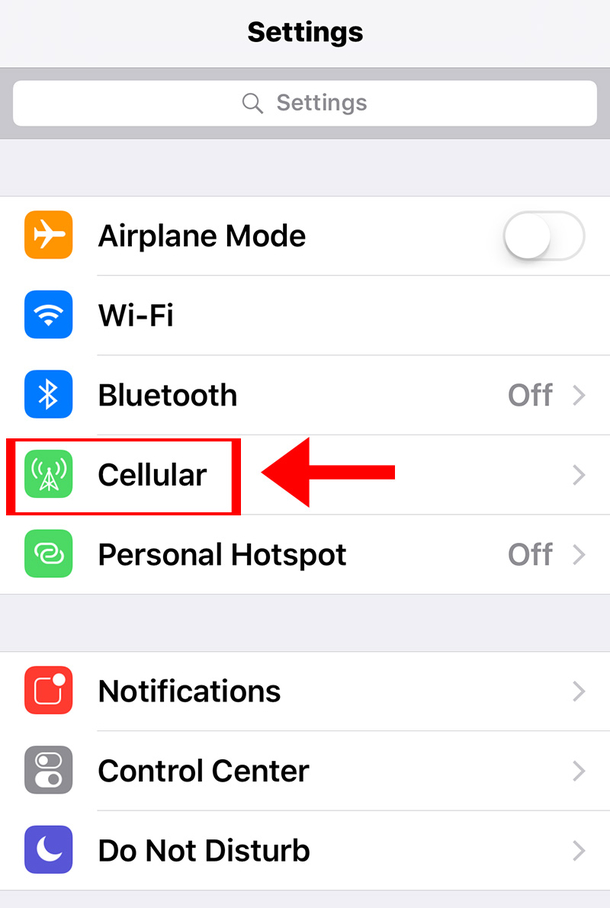
2. SCROLL DOWN UNTIL YOU SEE WI-FI ASSIST
Advertisement
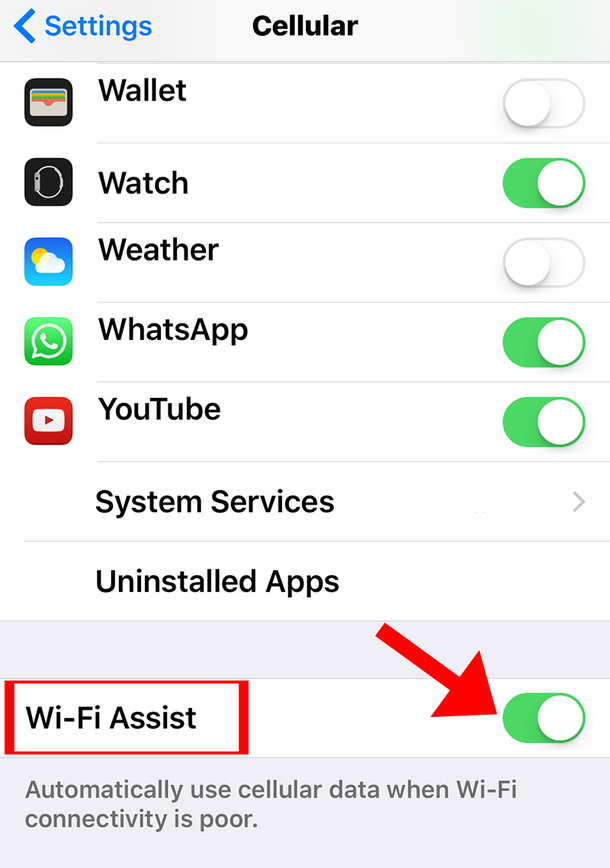
3. PRESS THE BUTTON TO SET IT OFF.
You might have just saved yourself a ton of money  Please make sure you help get the word out about this feature to anyone else with an iPhone.
Advertisement


